Case Study
Designing Prompt Studio: From Prompt Creation to Testing & Version Control
A workspace for developers and AI engineers to create, test, compare, version and release prompts used by their AI agents.
ROLE
Product Designer
SCOPE
Prompt Studio, incl. Stress Test.
PRODUCT
Netra
STATUS
Shipped

Netra helps the teams building them see what their agent is doing, catch problems, and make it reliable.

Prompt Studio is one part of Netra the part I worked on.
A single place for developers to create, run, compare, test and release the prompts behind their AI agents instead of writing in one tool, testing in another, and keeping track of versions by hand.

A single place for developers to create, run, compare, test and release the prompts behind their AI agents instead of writing in one tool, testing in another, and keeping track of versions by hand.
Developers
building agents
AI engineers
iterating on prompts
Reviewers
near production
I came in when the product was already underway, and shaped Prompt Studio as we worked out the wider prompt-management flow.
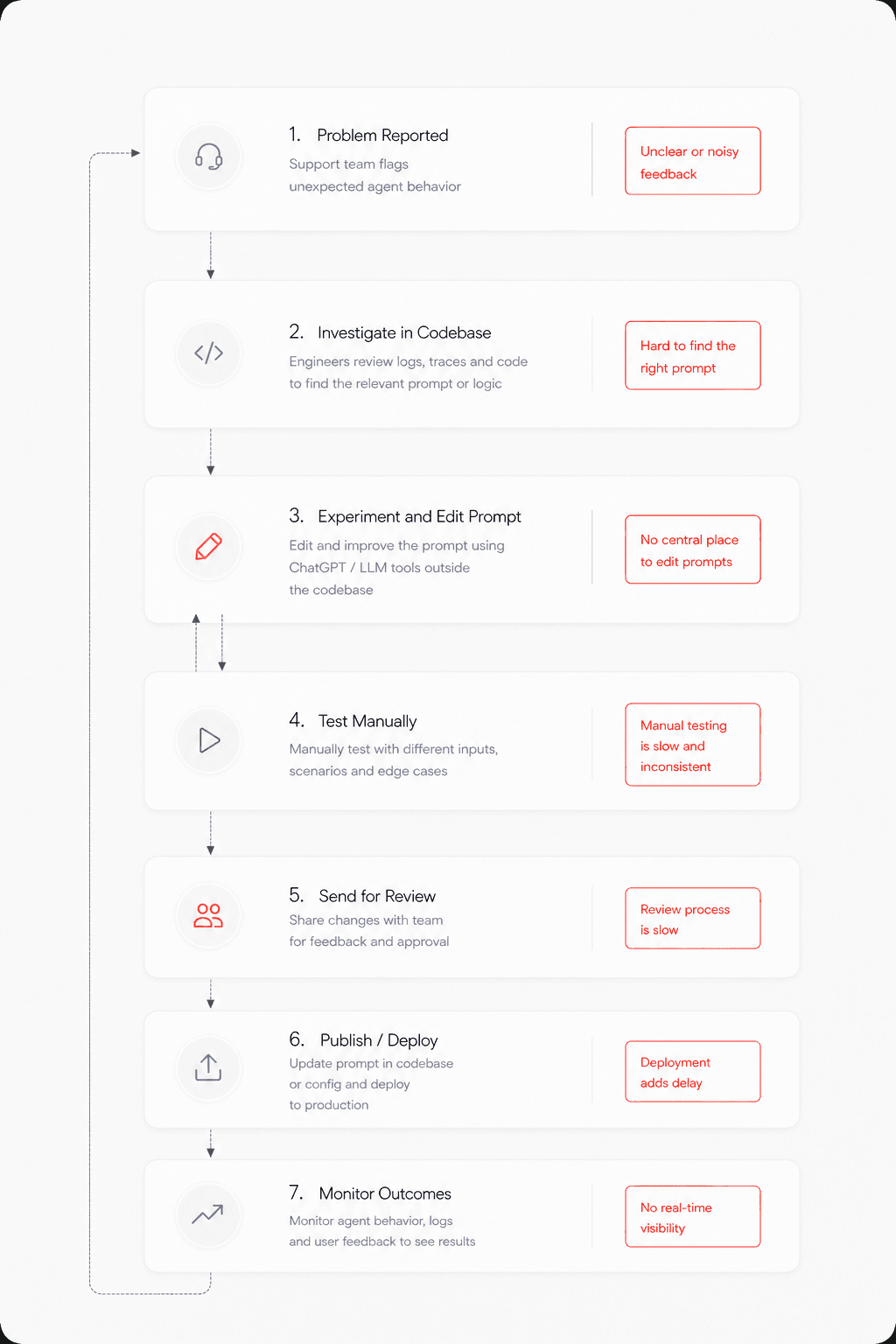
The same thing kept coming up when I talked to people across roles our product engineers and the developers building agents: one prompt, dragged through a dozen tools, breaking at every step.
Once I understood where the journey kept breaking and where the other tools came up short, the direction got pretty clear. So instead of copying how prompt tools already look, I started from a simpler question what does a prompt actually need across its whole life? and built the workflow around that. Everything below is that, stage by stage.

Keep creation in the flow ( eliminating the back-and-forth between LLMs and IDEs )
The user didn’t always need to start from a blank page. Prompt Studio also supported AI-assisted prompt creation and refinement. Instead of taking the user away from the editor, AI assistance was kept within the prompt workflow:
Write → Ask AI → Review → Edit → Continue

The user remained in control of the final prompt. AI could help with the first draft or refinement, but the prompt could still be edited manually.
Compare to find the best prompt ( making prompt exploration faster and broader )
Line up candidate prompts side by side and see their results together — so picking the best one is something you look at, not something you have to remember.

What changed - picking a version went from a gut call to something you can just see.
Prove it holds up, at scale ( building confidence through repeated runs and model configurations )
Run the prompt across models and repeated executions to find the best setup and see how reliable it is. Starting a run stays simple; the results open with the overall outcome first, then let you drill into models, evaluators and individual runs.
choose model → runs → evaluators → run → review


What changed - you could trust a prompt at a glance, or go digging the moment a result felt wrong.
Making Results Useful ( helping users progressively understand and act on results )
The first question should be: how did it go?
Stress Testing can produce a lot of information.
I structured the results so the user could start with the overall outcome and then go deeper when needed.
Overall result
→
Model comparison
→
Evaluator breakdown
→
Individual runs

The goal was to answer the high-level question first and make the detail available when the user needed to understand why.
Netra’s results experience includes overall analysis, model-level metrics, evaluator results and individual execution logs.

Logs gave developers a way to move from:
Something failed
to:
This is what happened during that run.

Now the developer could understand whether a change actually improved the prompt.
Stress Testing keeps test history connected to prompt versions and supports comparing reliability across versions.
Publishing is a decision, not a save ( adding validation and confidence before publishing )
̌̌Draft → Published → Production. A draft you can change however you want; publishing locks in a fixed, read-only version; production just points at whichever one is actually live.
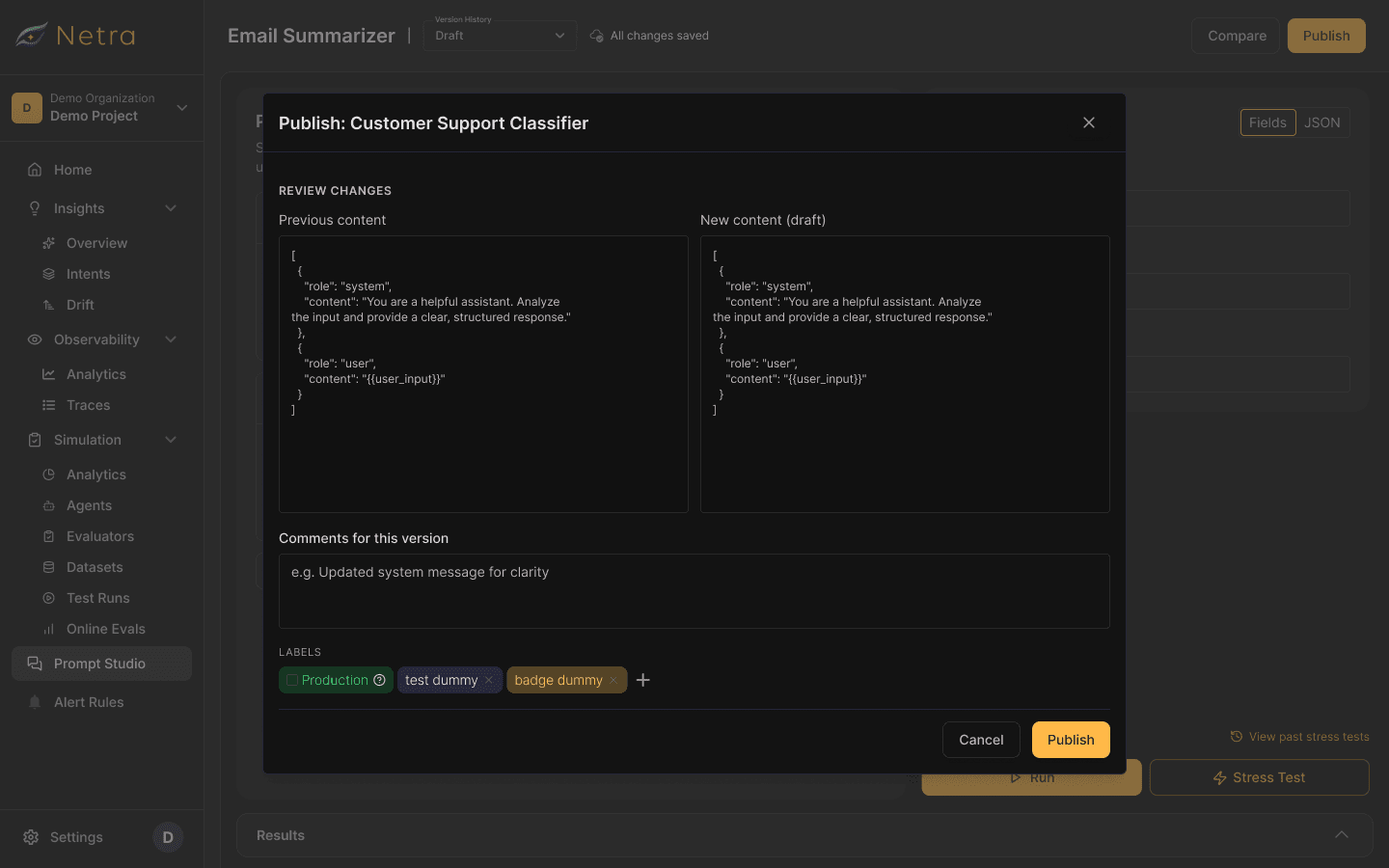

A safe way back ( making errors recoverable through version history )
Every published version sticks around, so production can drop back to an earlier one the moment something breaks - which closes the loop from create all the way to recover.

Removing Small Pieces of Friction
Naming wasn’t really part of the job
When someone starts creating a prompt, the useful thing is starting to write. Naming it is secondary.
So once the user started writing, the prompt could be automatically named based on its content.
The user could still change the name later.
This removed a small piece of setup without taking away control.
Saving Shouldn't Interrupt the Work
Once drafts were safe to change, I didn’t want users thinking about saving every time they edited a prompt.
We introduced automatic saving, with changes synced to the cloud every five seconds.
Auto-save only affected the draft. It never changed what was running in production.
01
Reframed the problem
Turned "prompt creation" into a full lifecycle — the backbone the rest of the product is built on.
02
Separated Draft, Published & Production
Developers could experiment all they wanted without ever putting what's live at risk.
03
Brought creation in-platform - generate & refine with AI
People stopped bouncing out to other tools to write prompts and just stayed put.
04
Simplified testing, made results progressive
Teams could size up reliability at a glance instead of drowning in metrics.
05
Designed one connected workflow - failures included
That scattered before-journey turned into one place — draft to production, without the guesswork.