Case Study
Designing Prompt Studio: From Prompt Creation to Testing & Version Control
A workspace for developers and AI engineers to create, test, compare, version and release prompts used by their AI agents.
ROLE
Product Designer
SCOPE
Prompt Studio, incl. Stress Test.
PRODUCT
Netra
STATUS
Shipped

TL;DR — FOR THE 2-MINUTE READ
Netra is an LLM observability platform for teams building AI agents. As teams started working more seriously with prompts, customers needed a more systematic way to create, test and manage them.
What I worked on: I designed Prompt Studio, a workspace for developers and AI engineers to:
Create → Test → Compare → Version → Release
The main challenge was how do we make prompt development feel like one connected workflow instead
of a collection of separate tools?My focus was provided a simplified experience in — Prompt editing · Testing · Comparison · Versioning ·
Production workflow
The Mess Behind Prompt Engineering
As teams started building AI agents, prompts were becoming more than just pieces of text.
A developer might write a prompt, change it several times, test it with different inputs, try another model, compare the results and eventually move a version into production.
The problem was that these activities could easily become disconnected.
There wasn’t a single, clear workflow for answering some basic questions:
Which prompt am I working on?
What happens when I change a prompt that’s already being used?
Which version is currently in production?
Does this change actually work better?
How does it behave across different models and repeated runs?
What happens if something breaks after release?

This led us to a broader question:
“How might we give developers one place to take a prompt from an early idea to a tested, reliable version running in production?”
Customers were asking for a more systematic way to manage prompts, while the market was also moving towards dedicated prompt-management workflows.
Who We Were Designing For
The primary users were developers and AI engineers building AI agents and reviewers who approve the final prompt. They needed to work with prompts in the context of a real application. The dev writing the instructions wants room to experiment and reviewer wants a reason to say yes. So we addressed both keeping their requirement in mind.
PRIMARY USER
AI / Prompt Engineer
VOLUME
Active Daily Use — Constantly iterating on prompt templates, running evals, and comparing model performance.
MENTAL MODEL
A prompt is the core configuration for agent behavior. Success means tuning system instructions, parameters, and model selection to optimize quality, latency, and cost.
SECONDARY USER
Release Reviewer — PM or Eng Lead
VOLUME
Release Gatekeeper — Logs in during deployment cycles to audit diffs and verify evaluation metrics.
MENTAL MODEL
A prompt is a production deployment risk. The goal isn’t copyediting; it’s ensuring the change won’t cause regressions, break guardrails, or destabilize production.

The Product Direction
I started thinking about Prompt Studio as a lifecycle rather than an editor.

Building the Prompt
The prompt had to remain at the centre
A prompt could include system instructions, user messages, variables, model configuration and other settings.
The challenge was keeping all of that available without making the editor feel like a configuration panel.

The final structure kept the prompt itself at the centre, while the surrounding controls provided the context needed to run and evaluate it.
Making Prompt Creation Easier
The user didn’t always need to start from a blank page. Prompt Studio also supported AI-assisted prompt creation and refinement. Instead of taking the user away from the editor, AI assistance was kept within the prompt workflow:
Write → Ask AI → Review → Edit → Continue

The user remained in control of the final prompt. AI could help with the first draft or refinement, but the prompt could still be edited manually.
Testing Against Real Inputs
A prompt needs to work with the inputs it will actually receive
A static prompt in an editor doesn’t always represent how an agent behaves at runtime.
Variables allowed developers to define the dynamic parts of a prompt and test them against realistic inputs.
This made variables part of the testing workflow rather than just another configuration option.

The First Major Decision
What happens when the prompt being edited is already in production?
Once prompts became part of an application, editing them directly created a problem.
Developers needed to experiment freely, but production needed to remain stable.
I worked around a simple distinction:
Draft → Published Version → Production
A draft could continue changing.
Publishing created a fixed version.
Production pointed to the version the application should actually use.
This separation allowed experimentation without affecting production stability.
Published versions are immutable, while labels show which version an application uses.
I explored different prompt builder structures before settling on this approach. Making published versions immutable ensures production stays predictable and prevents accidental changes.


Saving Shouldn't Interrupt the Work
Once drafts were safe to change, I didn’t want users thinking about saving every time they edited a prompt.
We introduced automatic saving, with changes synced to the cloud every five seconds.
The important distinction was:
Auto-save: Keep my work safe.
Publish: Make this version available.
Auto-save only affected the draft. It never changed what was running in production.
Removing Small Pieces of Friction
Naming wasn’t really part of the job
When someone starts creating a prompt, the useful thing is starting to write. Naming it is secondary.
So once the user started writing, the prompt could be automatically named based on its content.
The user could still change the name later.
This removed a small piece of setup without taking away control.
Comparing Different Approaches
Once there are multiple prompts, how do you know which one is better?
Developers could have different versions of the same prompt, different approaches or different model configurations.
Switching between them meant remembering what happened in each one.
I explored a side-by-side comparison approach so the candidates could be evaluated together.
The trade-off was density.
Showing multiple candidates meant giving each one less space, but for comparison, seeing them together was more useful than giving each candidate the full width of the editor.

Running the Prompt
Before testing a prompt at scale, developers needed a quick way to see what it actually produced.
The basic loop became:
Prompt → Run → Result
The result could then be understood through things such as:
Output · Model · Cost · Latency

This created a simple feedback loop before moving into more extensive testing.

if the prompt is being compared and run side by side
The Bigger Question: Does the Prompt Hold Up?
The Decision That Changed the Testing Flow
We initially explored five ways of testing
The first direction explored multiple testing approaches, each answering a slightly different question.


Each approach made sense individually.
But when we looked at the workflow as a whole, the user had to understand the testing system before they could answer the simpler question:
Does this prompt hold up?
The final flow became:
Choose Model → Choose Runs → Choose Evaluators → Run → Review
The deeper configuration was still available, but users didn’t have to understand all of it before starting.
Testing Across Models
The prompt isn’t the only variable
The same prompt can behave differently depending on the model and configuration used.
Stress Testing allowed developers to compare the same prompt across multiple model configurations.


The goal was to make the comparison useful across the things that matter when choosing a model:
Quality · Cost · Latency · Reliability
Stress Testing supports multiple models, repeated runs and evaluator-based analysis.
Defining What "Better" Means
A good result depends on what you’re trying to measure
Different prompts can have different requirements.
One might need a high-quality answer.
Another might need to stay within a latency or cost threshold.
Another might need to return a specific JSON structure.
We explored different ways of configuring evaluators before arriving at the final structure.
The final workflow allowed users to define what they wanted to evaluate without making the test setup feel like another technical configuration task.

Testing Takes Time
The test shouldn’t stop the rest of the work
Stress Tests can involve multiple models and repeated executions, so they aren’t always instant.
Instead of making the user wait on the page, the test could run in the background.
Start Test → Running → Continue Working → Results

Making Results Useful
The first question should be: how did it go?
Stress Testing can produce a lot of information.
I structured the results so the user could start with the overall outcome and then go deeper when needed.
Overall result
→
Model comparison
→
Evaluator breakdown
→
Individual runs

The goal was to answer the high-level question first and make the detail available when the user needed to understand why.
Netra’s results experience includes overall analysis, model-level metrics, evaluator results and individual execution logs.

Logs gave developers a way to move from:
Something failed
to:
This is what happened during that run.

Now the developer could understand whether a change actually improved the prompt.
Stress Testing keeps test history connected to prompt versions and supports comparing reliability across versions.
Releasing the Prompt
Publishing becomes the final decision, not another save action
By this point, the developer has:
Written
→
Tested
→
Compared
→
Iterated
The next step is deciding whether the change is ready to release.
The publishing flow allows the developer to review what changed before creating the next version.
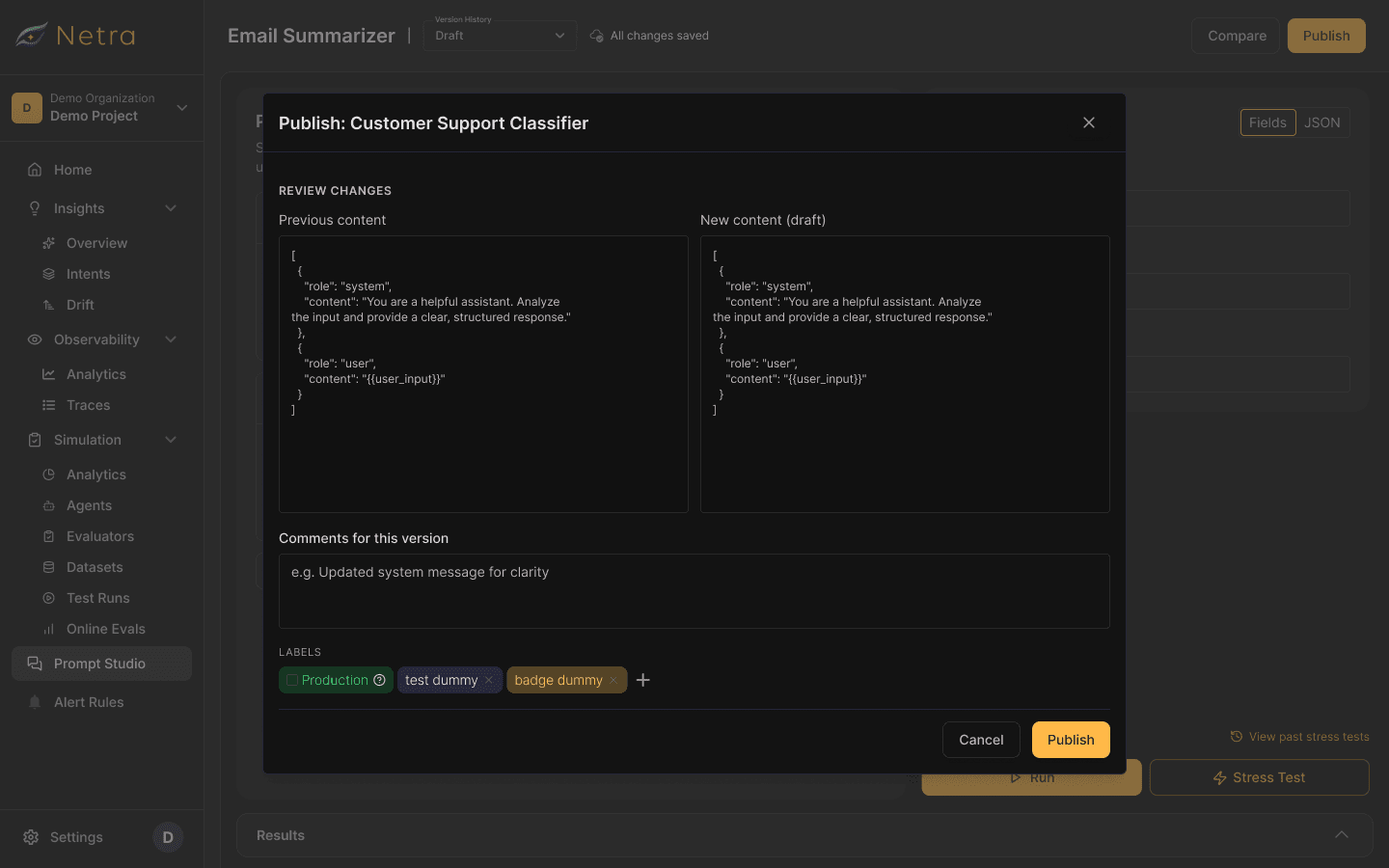
The published version becomes immutable, keeping the production state predictable.
When Something Breaks
Version history isn’t just a record
If a new prompt causes a problem, the team needs to know what changed and have a way to recover.
The production version can be moved back to a previous published version.
Production → Previous Version

[ system behaviour ]
Designing With Engineering
The behaviour had to work beyond the screens
A lot of the important work happened around system behaviour rather than visual design alone.
Auto-save
Changes needed to sync without interrupting the user.
Versioning
Published versions needed to remain immutable.
Stress Testing
Tests needed to run asynchronously while the user continued working.
Partial results
The interface needed to represent incomplete execution honestly.
Publishing
The system needed a clear distinction between a draft and a released version.

Keeping the Experience Consistent
Prompt Studio still had to feel like Netra
I reused existing patterns where they already solved the problem and extended them where the new workflow required different behaviour.

The Final Workflow
Prompt Studio eventually brought the different parts of prompt development into one connected loop:
One Connected Workflow, Not a Pile of Features. Start writing, and the prompt names itself. Auto-save holds the draft. Edit, compare candidates, stress-test the strongest, read the result, iterate. Publish a version, point production at it, and test again against the next change. The point was never any single feature — it was making these steps feel like one motion, so shipping a prompt looks less like copy-paste and more like a release.

What I Learned
01
The product model comes before the interface
Defining the relationship between drafts, versions and production made many of the downstream UI decisions clearer.
02
More capability doesn't mean more complexity should be visible
We explored five testing approaches, but the final entry point became simpler while the underlying system remained powerful.
03
Small friction compounds
Auto-save and auto-naming removed repeated actions that weren’t part of the user’s actual job.
04
States are part of the product
Running, failed, partial and cancelled aren’t just edge cases when the underlying system is asynchronous. They are part of the experience.
05
Good product design is often about making relationships clear
The most important work wasn’t any single screen. It was making the relationships between prompts, tests, versions and production understandable.