Case Study
Designing Prompt Studio: From Prompt Editing to Testing & Version Control
A workspace for developers and AI engineers to create, test, compare, version and release prompts used by their AI agents.
ROLE
Product Designer
SCOPE
Prompt Studio, incl. Stress Test.
PRODUCT
Netra
STATUS
Shipped

TL;DR — FOR THE 2-MINUTE READ
Netra is an LLM observability platform for teams building AI agents. As teams started working more seriously with prompts, customers needed a more systematic way to create, test and manage them.
What I worked on: I designed Prompt Studio, a workspace for developers and AI engineers to:
Create → Test → Compare → Version → Release
The main challenge was how do we make prompt development feel like one connected workflow instead
of a collection of separate tools?My focus was providied a simpified experience in - Prompt editing · Testing · Comparison · Versioning ·
Production workflow
01 · THE PROBLEM
Code Gets Tested. Prompts Got a Copy-Paste.
As teams started building AI agents with Netra, prompts were becoming more than just pieces of text.
A developer might write a prompt, change it several times, test it with different inputs, try another model, compare the results and eventually move a version into production.
The problem was that these activities could easily become disconnected.
There wasn't a single, clear workflow for answering some basic questions:
Which prompt am I working on?
What happens when I change a prompt that's already being used?
Which version is currently in production?
Does this change actually work better?
How does it behave across different models and repeated runs?
What happens if something breaks after release?
Customers were asking for a more systematic way to manage prompts, while the market was also moving towards dedicated prompt-management workflows.
This led us to a broader question:
"How might we give developers one place to take a prompt from an early idea to a tested, reliable version running in production?"
WHERE THIS FITS
Prompt Studio is the writing-and-staging half of the platform - where instructions get written, versioned and proven, before anything measures them in production. It is the surface the rest of Netra depends on being trustworthy.
WHY NOTHING CAN BE EDITED
A published version can’t be edited, only copied into a new draft. That single limit is what makes labels honest: if a version could change after being marked “production”, the label would be lying.
WHY TESTING EXISTS
One good run tells you a prompt can work. It tells you nothing about the fiftieth try, a messier input, or a different model underneath. That question needs a hundred answers before it means anything.
5
AI models compared in one test
6
ways to score an answer
1→100
runs per test - 1, 25, 50 or 100.
3
health states: ship, fix, or stop
02 · WHO IT’S FOR
Two People, Two Different Questions.
The person writing the instructions and the person approving them don’t mean the same thing by “done.” One wants room to experiment. The other wants a reason to say yes. Both live in the same screens, so the screens had to answer both.
PRIMARY USER
AI / Prompt Engineer
VOLUME
Opens it dozens of times a day: change something, try it, see whether it got better.
MENTAL MODEL
A prompt is a recipe. Instructions and settings go in, an answer plus its cost and speed come out.
MEASURED BY
How fast a rough idea becomes a version they trust enough to ship.
SECONDARY USER
Release Reviewer — PM or Eng Lead
VOLUME
Opens it at release time, reviewing what changed rather than writing it.
MENTAL MODEL
A version is a release candidate. The question is never “is this good writing?” but “is this safe to turn on?”
MEASURED BY
Whether the badge was green before they approved, and whether anything ever had to be rolled back.
03 · HOW I THOUGHT ABOUT IT
What happens when the thing you’re editing is already live?
If the prompt I’m editing is the same prompt my application is running, then every experiment is a risk — one careless keystroke and production shifts underneath me. My first instinct was a warning: confirm before you touch a live prompt. But a warning still leaves the mistake possible. So the answer moved into the model itself, not the UI. I split one idea into four things, each pointing at the next, so that editing and running could never be the same act.
Prompt
the named object (“Email Summarizer”)
→
Draft
editable working copy
→
Version
published, now permanent
→
Label
the release channel (“production”)
A Draft is yours to wreck. Edit it, throw it away, and nothing remembers. Publish it and it hardens into a Version that can be read and compared but never edited again. A Label is just a tag that points at one Version, which is why moving “production” from v6 to v7 takes a click instead of a deploy.
Why this shape, specifically
•
A warning wouldn’t have worked - if published versions stayed editable, no amount of “please don’t edit this” would stop someone breaking production by accident. Making it impossible was the only design that holds.
•
“v7” means nothing to a system, but “production” does - keeping the label separate from the version is what turns a rollback into one click instead of a re-publish.
•
Drafts needed somewhere to be wrong - nobody writes good instructions on the first try, so the messy part had to live somewhere that can’t reach customers.
04 · DESIGN PRINCIPLES
Four Rules, and Where They Came From.
05 · WRITING AND COMPARING
If there are three versions, how do you decide which is better?
At first I let people switch between candidates one at a time. It tested badly: comparing three meant holding two in your head while you read the third, and the comparison happened in memory instead of on screen. So I put the candidates side by side — each column a whole candidate, its own prompt, model and result. The cost was real: three columns give each prompt less width than a full editor would. For this task I took the trade, because comparing mattered more than sprawl.
netra · prompt studio · email summarizer

A production version sits beside two drafts. “Run all” fires every column at once — so the question stops being “does it work” and becomes “which one wins,” answered by looking, not remembering.
netra · prompt studio · configuring a model

Model settings sit beside the text they shape: provider, temperature, length.
netra · prompt studio · creating a prompt with AI

Drafting with AI: the model writes the first pass, the engineer owns every line after — and it lands as a Draft, never straight into a live version.
06 · VERSIONING & PUBLISHING
Every Publish Is a Diff, Not a Save
Publishing never overwrites anything. It shows what changed against the live version, the way a code review would, and asks you to say why. The value is the small pause it forces before something goes live. A label like production, staging or latest points at one version, and that label is what an application actually calls.
netra · prompt studio · publishing a prompt
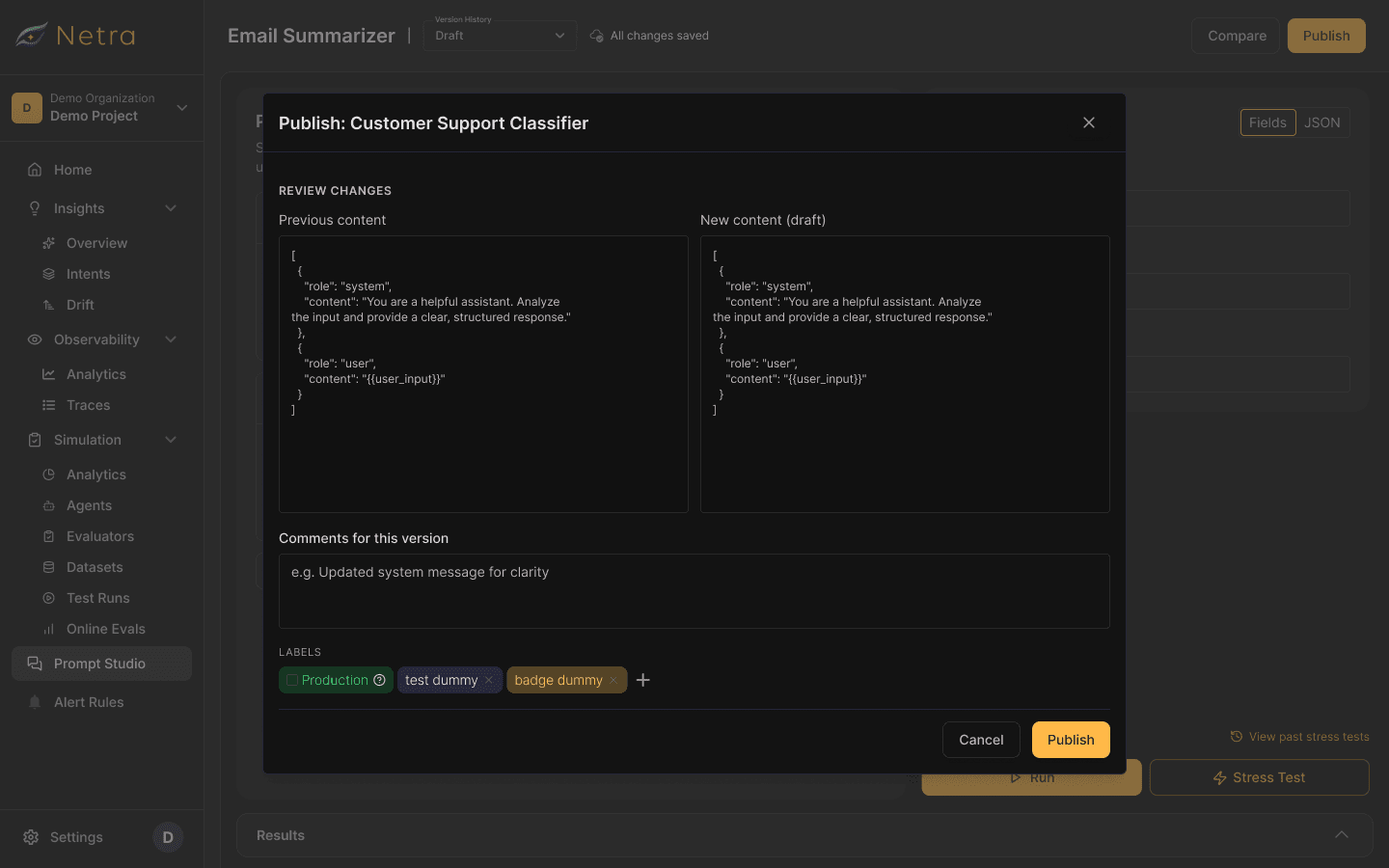
Every publish carries a note and a label, so the history reads back as a record of decisions.
netra · prompt studio · comparing versions

Model configuration sits beside the prompt - provider, model, temperature, max tokens and top-P.
netra · prompt studio · version history overlay

The version-history menu lists drafts, the published version, and actions to duplicate or delete a draft.
07 · SMALL DECISIONS, ONCE THE FOUNDATION HELD
Auto-Save and Auto-Naming Fell Out of the Model
Once drafts were the safe place to be wrong, two smaller things resolved themselves. If a draft can’t hurt anything, I shouldn’t have to think about saving it either — so edits sync on their own every few seconds, and auto-save only ever touches the draft; it never publishes. That one boundary keeps “don’t lose my work” and “make this version live” as two different actions instead of one dangerous one. Naming went the same way: nobody opens a blank prompt wanting to name it first, so once you start writing, the prompt names itself from what you wrote — rename it whenever you like. The rule under both: don’t make people do metadata work before they’ve done the real work.
the header state: the version dropdown beside “All changes saved”.
PLACEHOLDER - a new prompt naming itself from the first lines you write.
netra · prompt studio · version history overlay
PLACEHOLDER - version history screen showing the specific versioning behavior described here.
08 · THE VERSION I THREW AWAY
Five Ways to Test, and None of Them Answered the Question
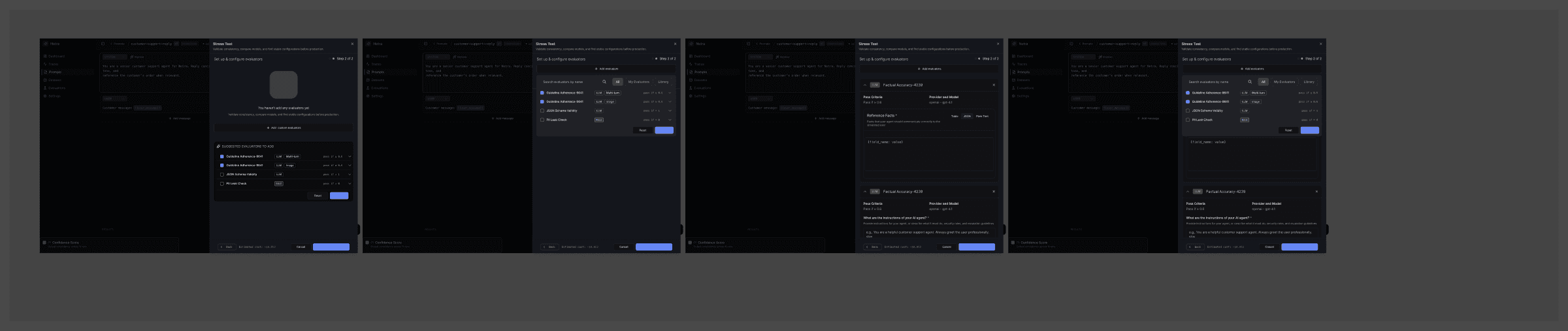
We explored five different ways of testing a prompt, and each one made sense on its own. Assembled into a flow, the first thing the screen asked was that you understand the testing system before you could ask the only question you actually had: does this prompt hold up? The capability was right and the entry point was wrong. We kept models, runs and evaluators, and moved everything else off the main path.
The first flow opened with a checklist of test types - Prompt Confidence Score, Cross-Model Stress Test, Temperature Sweep - all to be chosen before anything could run.
Step 2 of 2 was a searchable evaluator library with a threshold on every row, presented before the first test had ever run.
What it produced was one blended number. “Stress test passed - 87% confidence” told you it passed, but not what to fix.
The lesson was that capability and usability are not the same thing, and I had been optimising for the first.
09 · STRESS TESTING
One Good Run Proves Nothing
A prompt that works once has been demoed, not tested. I started by exploring five ways to test one — a model shootout, a consistency check, a temperature sweep, an input-variable test, and a full custom matrix. On paper each answered a different question. In the flow, they made people learn the testing system before they could ask the only question they actually had: does this hold up? So I cut the five-way chooser and made one path — pick models, pick how many runs, pick what to measure, run, review — with the depth still there for anyone who wants it. A stress test now runs a prompt up to 100 times across up to 5 models and scores every answer against the team’s own rules, before anything ships.
How a test runs
netra · stress test · setup
PLACEHOLDER - Stress Test setup screen with model selection, runs-per-model presets, and total execution count.
netra · stress test · evaluators
PLACEHOLDER - Stress Test setup screen for selecting evaluators before a run.
netra · stress test · evaluator detail

The Stress Test flow lists evaluators with pass thresholds before the run starts.
netra · stress test · in progress

Runs happen in the background — the prompt stays editable, and a test can be stopped mid-run.
Reading the result without being a data analyst.
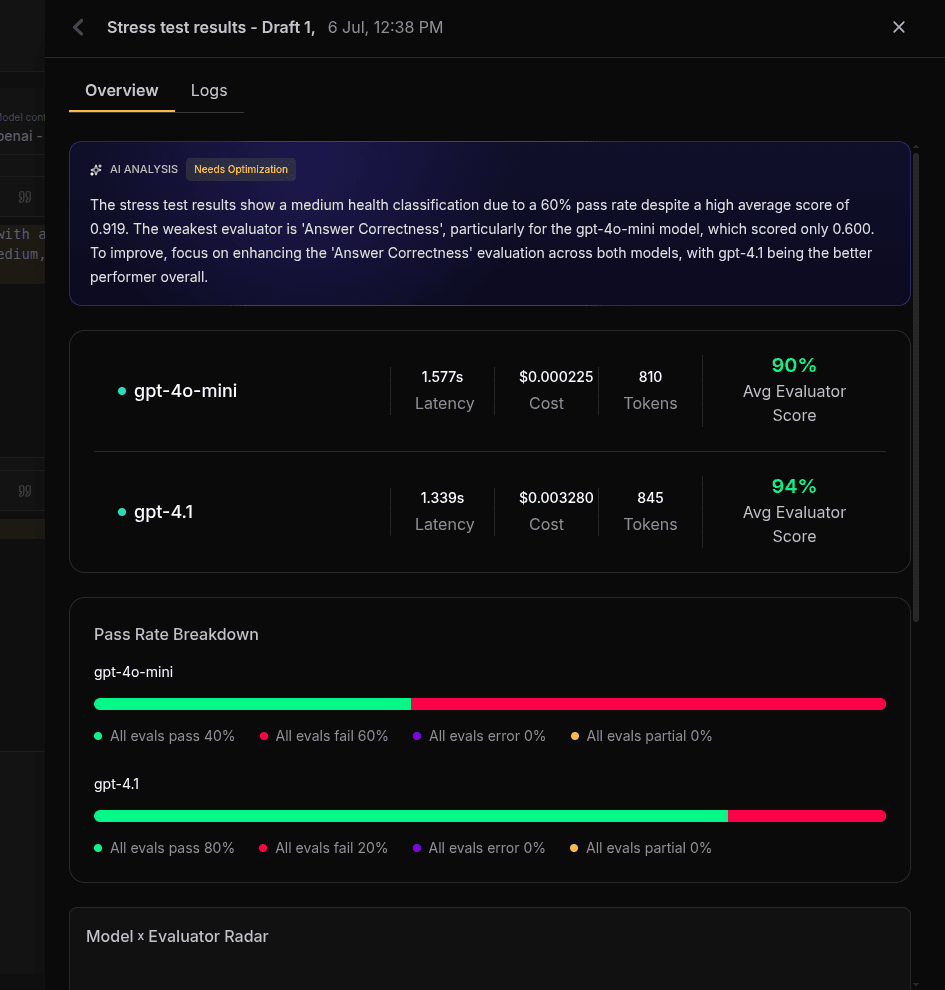
One badge sits above every chart - Healthy, Needs Optimization, or Critical Issues. Nobody should have to read a chart to find out whether they can ship.
🟢 Healthy — ready to publish
🟡 Needs Optimization
🔴 Critical — do not publish
netra · stress test · results

Under it: pass rate per model, and one radar chart comparing every model across quality, speed and cost - because the cheapest model is rarely the best one.


10 · SMALL DECISIONS INSIDE TESTING
Runs, Models, and What “Good” Means
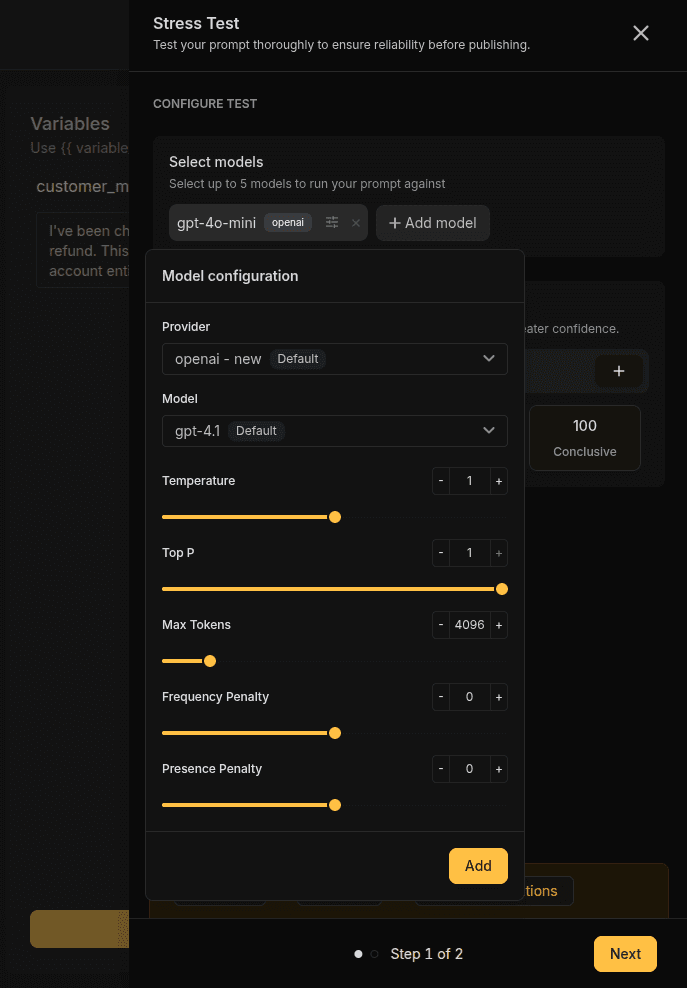
Three smaller choices sit inside the one testing flow. Runs come as presets — 1, 25, 50, 100 — because a blank number field asks people to guess at statistics; the presets carry the meaning instead. Models are a multi-select, because the same prompt rarely behaves the same on every one, and the useful question is where it breaks. And “good” had to be defined, so evaluators let a team say what good means here — sometimes correctness, sometimes latency, sometimes cost, sometimes a strict JSON shape. None of these earned its own screen; they live inside the flow as sensible defaults you can open up.


11 · WHY THESE CHARTS
Every Chart Answers One Question
There are a dozen ways to draw reliability data. I picked each one against a question a reviewer actually asks out loud, rather than whatever the charting library offered first.
•
Health badge before any chart — the question is binary: “can I ship this?” The answer is a single traffic-light word, not a dashboard to interpret under time pressure.
•
A chart only when it answers something - bars for where a model fails, one radar for which model wins overall, and a trend line only once there are two tests to compare, because with one data point a chart is decoration.



12 · VERSION + TEST HISTORY
A Score Is Only Useful Tied to a Version
A score floating on its own is trivia. Attached to the version that produced it, it becomes evidence. Every stress test is pinned to the exact version it ran against, so history reads as a chain — version, test, result, next version, test again — and you can finally answer whether a change made the prompt better or quietly worse. Reliability stops being a snapshot and becomes a trend.
13 · WHEN THINGS GO WRONG
A Test Takes Time — So It Can’t Block the Work
A stress test can run for minutes, so I couldn’t treat it like a button that freezes the screen until it’s done. It runs in the background — start it, keep editing, come back to results. Which means the interesting design isn’t the happy path; it’s the day the test itself falls over. Each state below went to engineering written down, not left as a to-do.
•
One model dies mid-test - the other three results still show, marked incomplete, with the failed model called out on its own. Never a blank screen.
•
Someone stops a test - the runs that already finished keep their scores. It is labelled partial, not thrown away: 60 finished runs are still a real signal.
•
A blank field - the test won’t start. It is caught at setup, not five minutes later as a wall of failures.
•
A test still running - publishing is blocked, with the reason spelled out rather than a greyed-out button.

14 · ENGINEERING
The Decisions Got Real in the Build
Most of these only became true once engineering and I worked them through. Immutability: a published version can’t be edited, so any change forks a new draft — enforced in the data model, not just the UI. Auto-save: syncing every few seconds meant designing the save status, the retry and the conflict, not only the happy path. Async testing: a background run needs its progress, partial results and failures to survive a refresh. Publishing: the diff-and-comment gate needs a hard line between a mutable draft and a frozen version. The interface is the visible half; these contracts are the other half.
15 · DESIGN SYSTEM
Consistent With the Rest of Netra
I tried not to invent a pattern just because this surface was new. Where a Netra component already solved the problem — buttons, inputs, tables, the toast system — I reused it. Where the behaviour genuinely differed — the side-by-side composer, the health badge, the run matrix — I extended an existing pattern instead of starting over. New patterns had to earn their place, and most didn’t need to.
16 · WHERE IT LANDED
Shipped, Documented, Measurable
Both surfaces are live inside Netra and written up in the public docs. The screens above are the shipped product, not a concept. The product is young, so I am not going to hand you adoption numbers I would have to invent. What I can point at is the instrumentation built to earn them: a score on every version, pass rates tracked over time, and a record of every label that ever moved. The work keeps its own scoreboard.

17 · THE WHOLE LOOP
One Connected Workflow, Not a Pile of Features
Start writing, and the prompt names itself. Auto-save holds the draft. Edit, compare candidates, stress-test the strongest, read the result, iterate. Publish a version, point production at it, and test again against the next change. The point was never any single feature — it was making these steps feel like one motion, so shipping a prompt looks less like copy-paste and more like a release.
18 · THE DECISIONS AT A GLANCE
What Changed, and Why
Drafts reaching production → split into Draft, Version and Label, so experiments can’t touch customers. Comparing alternatives → side-by-side candidates, trading width for a comparison you can actually see. How testing starts → five approaches collapsed into one flow, with the depth kept underneath. While a test runs → it runs in the background, so it never blocks the work. When a test fails → explicit states, each naming the next action. Releasing a change → diff, comment, immutable version. Small edits → auto-save, scoped to the draft only. Naming → generated from the prompt, renamable later.
19 · WHAT I LEARNED
What This Project Actually Taught Me
01
The model of a thing comes before the look of it
The composer, the diff view, the label picker - all of it followed from one decision made before any of them existed. Draft, Version and Label are three different things, not three moods of the same thing. I have never seen good visual design rescue a product that got that part wrong.
02
Making something impossible beats warning about it
Locking published versions deleted a whole species of worry from the product, the “hang on, did someone touch this?” kind. I did not need a warning dialog, because there was no longer a mistake left to warn about.
03
A confidence score is worthless without a threshold someone chose on purpose
The AI Analysis badge earns its authority from something unglamorous: the team sets each pass rule themselves, and can see every one. Had I hidden those defaults, the badge would have felt like a black box telling people what to do.
Reliability as a Design Problem
Both surfaces ship inside Netra today. What I keep taking from the project is smaller than the product itself. Most of the trust in an AI feature gets built outside the model: in whether you can see what changed, undo it, and prove it worked before a customer proves it for you. The chat window is the easy part.